

Grabbit
Linux WindowsPaste. Pick. Download.
There's a gap between knowing a video exists and actually having it. Command-line tools can reach it — but not everyone wants to live in a terminal. And browser extensions do too little the moment you need format control, a queue, or a playlist.
Grabbit fills that gap. It wraps yt-dlp — one of the most capable download engines available — in a clean desktop interface. Paste a URL, pick your format, and add it to the queue. That's the whole flow.
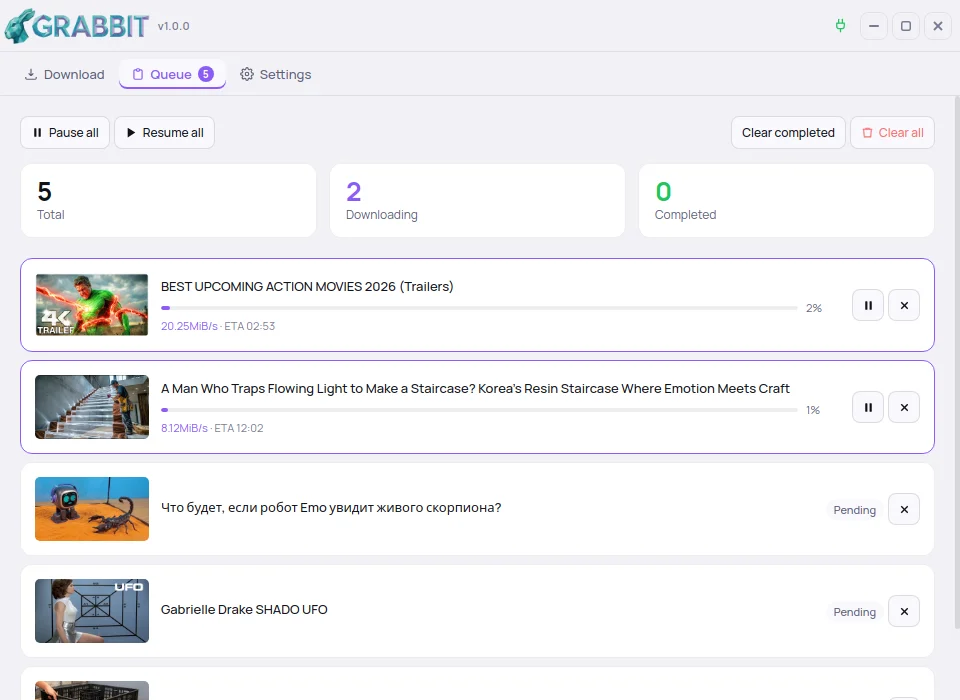
The queue is the core of Grabbit. Downloads run concurrently, can be paused or resumed individually or all at once, and survive a restart — the queue is persisted to disk. When something fails, a single click retries it.
Format control is where Grabbit goes further than most tools. Video quality and codec, audio format and quality, subtitle language and format — each is selected independently, either as a global default in Settings or overridden per download. Output goes to MP4 or MKV, your choice.
For power users, an advanced options modal exposes any yt-dlp parameter directly. Configurations can be saved as named presets and reused across downloads. Proxy support, rate limiting, cookies and a full diagnostics panel are all there when you need them.
Open source. MIT licensed. Built in the AurigaLAB.
Screenshot
Features
Everything you need. Nothing in the way.
Concurrent downloads with pause, resume and retry per item or for the whole queue. The queue persists across restarts.
Pick video quality and codec, audio format and subtitles — each independently, per download. Merge to MP4 or MKV.
Built on yt-dlp. YouTube, Dailymotion, Vimeo and thousands more — if yt-dlp can reach it, Grabbit can download it.
Add single URLs or entire playlists. Grabbit analyses the link automatically and lets you select formats per entry.
Expose any yt-dlp parameter via an optional modal. Save your favourite configurations as reusable named presets.
Italian, English, German, Spanish, French and Portuguese. Auto-detected from your system on first run.
Free and open source. Linux and Windows.
FFmpeg must be installed on your system — Grabbit detects it automatically from your PATH or common install locations. yt-dlp is bundled and needs no separate install.
Linux (Ubuntu / Debian / Mint)
sudo apt install ffmpeg Windows
winget install ffmpeg Changelog
What's changed across versions.
Windows support
- — Native Windows build — portable .zip, no installation needed
- — Frameless window with native dragging, minimize, maximize and close
- — Fixed brief white/black flash on startup on Windows
First release
- — Download queue with concurrent downloads, pause/resume and retry
- — Format control — video quality, codec, audio and subtitles independently
- — Full playlist support with per-entry format selection
- — yt-dlp bundled — no separate install needed
- — Localized in Italian, English, German, Spanish, French and Portuguese
- — Linux AppImage — self-contained, no installation
// Built at AurigaLAB
Source on GitHub